

Ahara Kar is the online portal for the Karnataka Food and Civil Supplies Department. You can access it at ahara.karnataka.gov.in. It had a previous name of ahara.kar.nic.in. It offers all Public Distribution System (PDS) services in one place.
You can use the website to Apply for a new ration card, check application status, download e-ration cards, Link Aadhaar, Check DBT details, Get info about fair price shops.
Important Posts
Ahara Karnataka Portal Overview
| Portal Name | Ahara Karnataka (Ahara Kar) |
| Official Website | ahara.karnataka.gov.in |
| Managed By | Food and Civil Supplies Department, Government of Karnataka |
| Purpose | Online ration card management and PDS services |
| Beneficiaries | All ration cardholders in Karnataka (BPL, APL, Antyodaya) |
| Launch Year | 2018 (digitalization initiative) |
| Primary Services | New ration card application, status tracking, card download, DBT status, Aadhaar linking, amendments |
| Helpline | Toll-free 1967 (PDS queries), 14445 (grievances), 1800-425-9339 (general). |
| Key Scheme | Annabhagya Scheme (subsidized food grains) |
| Monthly Allocation | 5 kg per family member |
- Important Posts
- Ahara Karnataka Portal Overview
- Services Available on Ahara Karnataka
- How to Apply for New Ration Card on Ahara Portal
- Editing Saved Ahara Kar Applications
- How to Withdraw Ahara Kar Application
- Applying Through Offline Centers
- Checking Your Ration Card Status
- Downloading Your Ration Card
- How to Check DBT Status on Ahara Kar
- Linking Aadhaar with Your Ration Card
- Making Corrections to Your Ration Card
- Checking Cancelled or Suspended Ration Cards
- Annabhagya Scheme Karnataka
- Frequently Asked Questions – Ahara Karnataka Portal
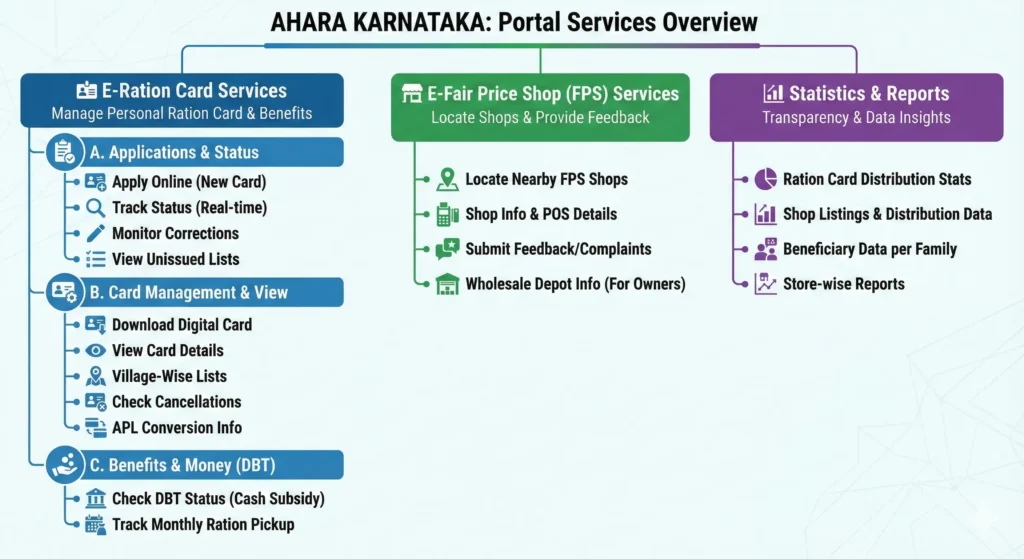
Services Available on Ahara Karnataka
The portal offers a comprehensive range of services organized into three main categories. Each service works to make ration card management easier for people in Karnataka.
How to Apply for New Ration Card on Ahara Portal
Ahara.kar.nic.in manages the online application process. It uses Aadhaar verification at each step.
Step 1: Access the Portal

- Visit ahara.karnataka.gov.in
- Select e-services menu
- Click on e-Ration sub-menu
- Choose your preferred language (Kannada or English)
Step 2: Select Application Type

- Click on New Ration Card Request
- Choose Non-Priority Household (NPHH) for general category
- Enter your Aadhaar number
- Enter mobile number registered with Aadhaar
- Click Go button
Step 3: Provide Aadhaar Consent

You need to consent to share your Aadhaar details. click the Aadhaar consent option. This allows you to incorporate your Aadhaar information into the ration card.
Step 4: Complete Authentication

Two authentication modes are available:
OTP Method:
- Select One Time Password to Mobile Number option
- You receive the OTP on your Aadhaar-registered mobile.
- Enter received OTP and captcha
- Click Go button
Fingerprint Method:
- Select Finger Print Verification Authentication
- Click Capture button
- Place finger on biometric device
- Enter captcha
- Click Verify button
After verification, your Aadhaar details will show on the screen. This includes your name, date of birth, gender, and photo.
Step 5: Generate Application Number

- Verify displayed Aadhaar details
- Click Add button to generate application number
- Note down this application number for future reference
Step 6: Add Family Members

Repeat the authentication process for each family member:
- Enter their Aadhaar number
- Complete OTP or fingerprint verification
- Add them to the application
- Delete members by checking the checkbox and clicking Delete/Add again
Step 7: Select Address

- Check the checkbox for the member whose address should appear on the ration card
- Click Next Stage button
- The system auto-selects Fair Price Shop based on pin code
- Area is automatically assigned
Step 8: Choose Location Details

For Urban Areas:
- Select your city from dropdown
- Choose ward number
- Select specific area
For Rural Areas:
- Select Gram Panchayat from dropdown
- Choose village name
- Confirm details
- Click Next Stage to proceed
Step 9: Assign Head of Family

Select the eldest female member above 18 years as Head of Family. This follows National Food Security Act 2013 provisions. If no female member is above 18, select the eldest male member.
Click Next Stage after selection.
Step 10: Define Relationships

- Click Select button for each remaining member
- Assign their relationship with Head of Family
- Click Save after completing all relationships
Step 11: Willingness to Draw Ration

Select Yes if you want to draw rations from the assigned Fair Price Shop. Choose No if you don’t intend to collect rations but need the card for identification purposes.
Step 12: Review and Submit

- A specimen copy of your ration card appears on screen
- Review all details carefully
- Service charge of Rs. 70 displays (for Speed Post delivery)
- Click Generate RC button if details are correct
- Click Print button to save a copy
You submitted your application. It’s now with the ward or Gram Panchayat officials for verification.
Editing Saved Ahara Kar Applications

You can modify applications that haven’t been submitted yet through the Edit Saved Request option.
Edit process:
- Click Edit Saved Request on Ahara portal homepage
- Enter your application number
- Click Go button
- Select a family member for authentication
- Complete Aadhaar authentication (OTP or fingerprint)
- Application details display after successful verification
- Make necessary changes following the same steps as new application
- Save updated information
This feature helps correct mistakes or update information before final submission.
How to Withdraw Ahara Kar Application

If you need to cancel your ration card application, the portal provides a withdrawal option.
Withdrawal steps:
- Select Application Withdrawal from homepage
- Enter application number
- Click Go button
- Choose a member from dropdown list
- Click Go to proceed to authentication
- Provide Aadhaar consent
- Complete authentication (OTP or fingerprint)
- Application withdraws automatically after successful verification
- Confirmation message displays on screen
Once withdrawn, you’ll need to start a fresh application if you decide to apply again.
Applying Through Offline Centers
Karnataka residents can apply at many offline centers, along with the online portal.
Available centers:
- Bangalore One centers
- Karnataka One centers
- Common Service Centers (CSCs)
- Janasnehi Kendra
- Gram Panchayat offices
- Point of Sale (POS) shops at Fair Price Shops
- Private franchises
When applying at these centers, carry:
- Aadhaar cards of all family members
- Income certificate (for PHH cards)
- Mobile number registered in Aadhaar
At these centers, operators walk you through biometric authentication. They also take care of your application for you. You need the same online steps, but staff support helps those who aren’t used to digital processes.
Checking Your Ration Card Status
Tracking your application or card status requires just a few clicks. The portal provides real-time updates on all requests.

For New Applications:
- Visit the Ahara Karnataka portal homepage
- Click on “E-services” in the main menu
- Select “New/Existing RC Request Status”
- Choose your division from the dropdown (Bangalore, Mysore, or Kalaburagi)
- Enter your acknowledgment number or ration card number
- Select verification type (mobile number or Aadhaar)
- Click “Go” to view status
The status screen shows if your application is pending, verified, approved, or rejected. If rejected, reasons for rejection appear on the screen.
For Existing Card Updates: If you’ve sent a correction request, follow the same process. The portal shows the status of your modification request. It also gives the expected completion time.
Status Types Explained:
- “Submitted” means your application is in the queue
- “Under Verification” indicates officials are reviewing documents
- “Field Verification Pending” means a home visit is scheduled
- “Approved” confirms your card is ready
- “Rejected” shows the application was denied with reasons
Downloading Your Ration Card
The Ahara portal allows instant download of digital ration cards. This e-Ration card has the same validity as physical cards.
Download Process:
- Log into ahara.karnataka.gov.in
- Navigate to “E-services” section
- Click “Download Ration Card” option
- Enter your ration card number
- The system sends an OTP to your registered mobile
- Enter the OTP for verification
- Your ration card appears on screen in PDF format
- Click download to save a copy
The downloaded card shows all family members, card type (BPL/APL), and fair price shop assignment. You can print this document for your records. Many government services accept e-Ration cards as proof of residence or identity.
How to Check DBT Status on Ahara Kar
Direct Benefit Transfer puts subsidy money directly into beneficiaries’ bank accounts. The portal lets you verify these transactions.

Checking DBT Payments:
- Access the Ahara Karnataka portal
- Go to “e-Services” section
- Select “DBT Status”
- Choose your division
- Click “Status of DBT” link
- Enter the year and month you want to check
- Provide your ration card number
- Complete the CAPTCHA verification
- Click “Go” to view payment details
The screen displays subsidy amount, payment date, bank account number (last 4 digits), and transaction reference. This helps you confirm that subsidies are reaching your account correctly.
Linking Aadhaar with Your Ration Card
Aadhaar linking is mandatory for all ration cardholders in Karnataka. This prevents duplicate cards and ensures subsidies reach the right beneficiaries.
Linking Process:
- Visit the official Ahara website
- Access “e-Services” menu
- Select “Linking UID” under e-Ration Card section
- Enter your 12-digit Aadhaar number
- Click “Go” to initiate linking
- An OTP is sent to your Aadhaar-registered mobile
- Enter the OTP for verification
- Provide your ration card number
- Confirm to complete the linking
The system verifies your Aadhaar details with UIDAI database. If your address on Aadhaar differs from your ration card address, you may need to update one of them first.
Making Corrections to Your Ration Card
Life changes like marriages, births, deaths, or address changes require ration card updates. The portal handles amendment requests online.
Types of Corrections Allowed:
- Adding new family members (newborns, spouses)
- Removing deceased or married members
- Changing address within Karnataka
- Updating mobile numbers
- Correcting spelling errors in names
- Modifying income details for card type change
Amendment Procedure:
- Log into your Ahara account
- Go to “e-Services” section
- Select “Amendments to Existing Ration Card”
- Enter your ration card number
- Choose the type of amendment needed
- Fill in new or corrected details
- Upload supporting documents
- Submit the request
Processing Time: Amendment requests typically take 15-30 days for processing. You can track status using the same method as new applications. Officials may verify major changes through field visits.
Checking Cancelled or Suspended Ration Cards
Sometimes ration cards get cancelled or suspended due to various reasons. The portal lets you verify this status.
Reasons for Cancellation:
- Duplicate ration cards detected
- Family moved out of Karnataka
- All family members deceased
- Fraudulent information found
- Non-collection of rations for extended period
Verification Process:
- Visit ahara.karnataka.gov.in
- Access “e-Services”
- Select “Check Withheld Ration Card”
- Enter required details
- Click “Go” to view the list
If your card appears in the suspended list, contact your local Food and Civil Supplies office. They can explain the reason and guide you on how to reactivate it if eligible.
Annabhagya Scheme Karnataka
The Annabhagya Scheme is a major food security program of the Karnataka government. The Department of Food, Civil Supplies, and Consumer Affairs manages it. Each person in Below Poverty Line (BPL) and Antyodaya (AAY) families receives 10 kg of free rice each month. The Public Distribution System (PDS) provides this.
The 10 kg rice includes 5 kg from the National Food Security Act (NFSA) and 5 kg given by the state government. The aim is to make sure poor families have access to food grains and to fight hunger across the state.
The state provided an extra 5 kg of rice through Direct Benefit Transfer (DBT) due to supply issues. Beneficiaries received ₹34 per kg. But from February 2025, the government has started giving full rice distribution again.
Families with BPL or Antyodaya ration cards can now get their monthly rice at local Fair Price Shops. The Annabhagya Scheme supports food security, reduces poverty, and improves welfare across Karnataka.
Frequently Asked Questions – Ahara Karnataka Portal
You need Aadhaar cards of all family members, address proof (electricity bill or rental agreement), income certificate for BPL cards, passport-size photos, and bank account details. Keep files under 200 KB in JPG or PDF format.
Processing typically takes 15 to 30 days after submission. Track your application status in real-time using your acknowledgment number on the portal.
No. Aadhaar is mandatory for ration card applications in Karnataka. Enroll at an Aadhaar center first to obtain your 12-digit number before applying.
BPL cards are for families below the poverty line and receive rice at ₹3/kg. APL cards are for families above the poverty line with moderately subsidized rates.
Yes. Submit an address change amendment through the portal with new address proof. Your card will be transferred to a fair price shop in the new location after verification.
View your ration card details on the portal. The assigned shop name, address, and contact details appear on your card or under “View Fair Price Shops” in e-Services.
Visit your nearest Grama One, Karnataka One, or Bangalore One center and request to update your status to “Willing to Draw Ration.” Carry your ration card and Aadhaar for verification.
Sharing is caring